From App Crashes to Kernel Panics: Introducing logcat.ai
Every developer knows this nightmare:
Android developers: You get a bugreport. 100MB of dense logs. 500,000 lines of logcat. Your app crashed in production, and somewhere in this digital haystack is the answer.
Linux kernel developers: A cryptic kernel panic in dmesg. Driver initialization failures across different hardware. Memory corruption buried in thousands of subsystem logs.
You spend hours grep-ing, scrolling, pattern-matching. You might find the crash. You might miss the memory leak that caused it. You’ll definitely miss the subtle correlations between subsystems.
What if AI could read all of it in a few minutes and tell you exactly what went wrong?
At a Glance
- Purpose-built AI for Android & Linux log analysis
- Analyze
100MB+files in minutes- Chat with your logs like talking to a senior engineer
- Multi-collection search across bugreport + logcat + dmesg
The Solution: AI-Powered Log Analysis for Android and Linux
Today, we’re launching logcat.ai—the industry’s first AI-powered observability platform purpose-built for Android and Linux systems. It transforms raw bugreports, logcat files, and kernel logs into actionable insights using advanced AI technology. Upload your 100MB bugreport or dmesg output, get AI analysis in a few minutes, and chat with your logs like you’re talking to a senior engineer who understands both userspace and kernel internals.
Who Is logcat.ai For?
logcat.ai serves everyone who touches Android and Linux development:
Application Development
- App Developers: Find crashes,
ANRs, and performance bottlenecks instantly - Platform Engineers: Deep-dive into
system_server,WindowManager, or issues at any layer of the OS
System & Kernel Development
- Linux Kernel Developers: Debug kernel panics, driver issues, and subsystem interactions
- Embedded Systems Engineers: Understand boot failures and hardware initialization sequences
Enterprise & Support
- OEMs & Device Manufacturers: Analyze hardware-specific failures across device lines
- Support Teams: Triage customer bugreports without deep engineering expertise
- QA Engineers: Automate regression analysis and log monitoring
Key Features: Beyond Traditional Log Analysis
True AI Understanding, Not Just Pattern Matching
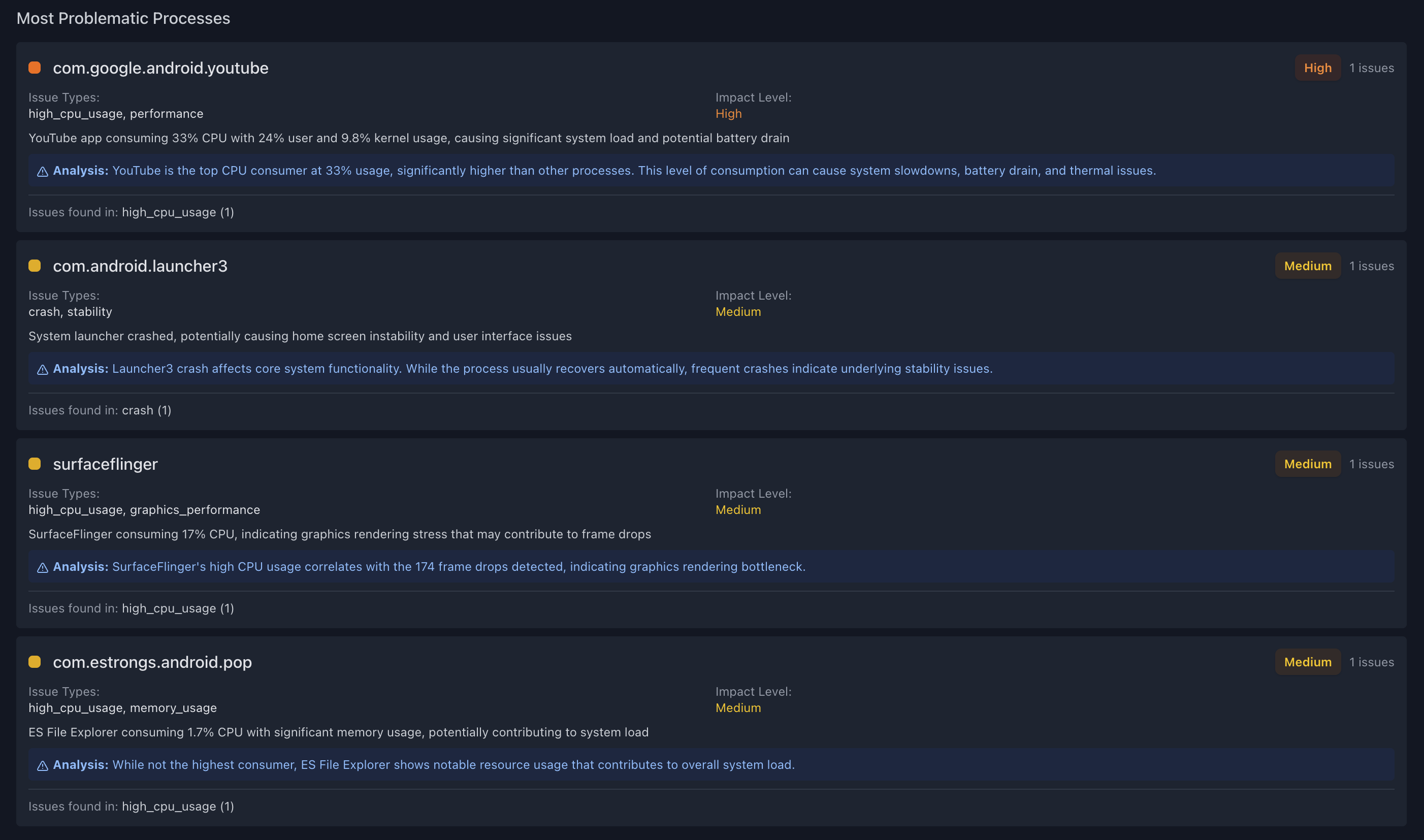
- Powered by advanced AI models with specialized Android and Linux kernel knowledge
- Semantic search across millions of log lines to find relevant context
- Contextual analysis that understands cross-subsystem causality—like how a memory allocator failure in one driver might trigger a panic in another
Intelligent Visualization and Timeline Analysis
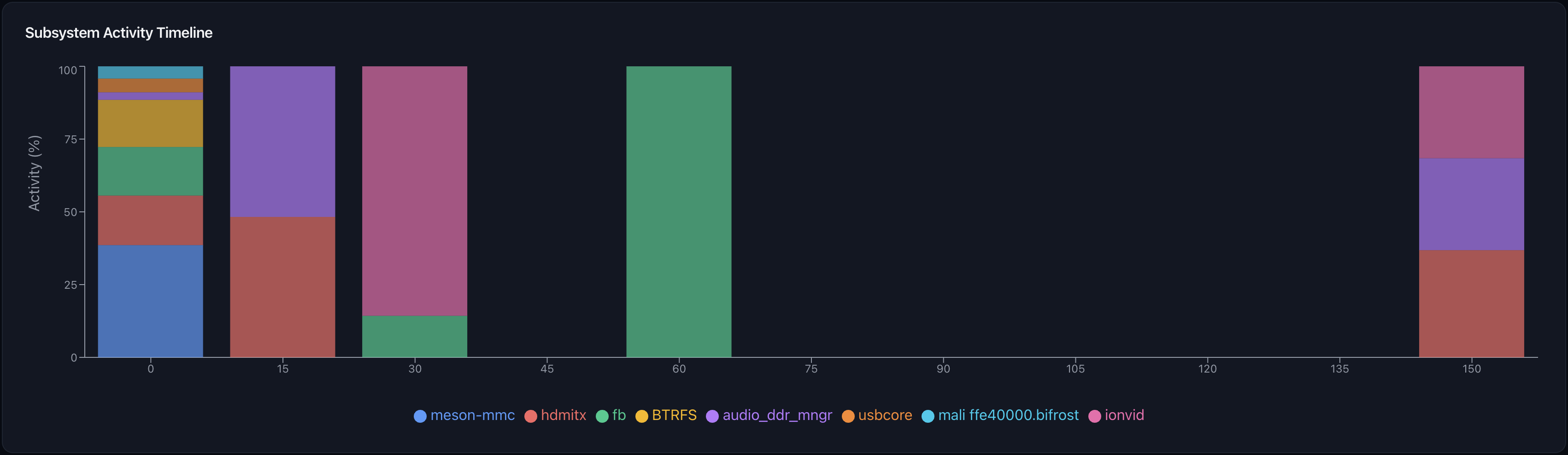
- Subsystem-based timeline charts that adapt to your data
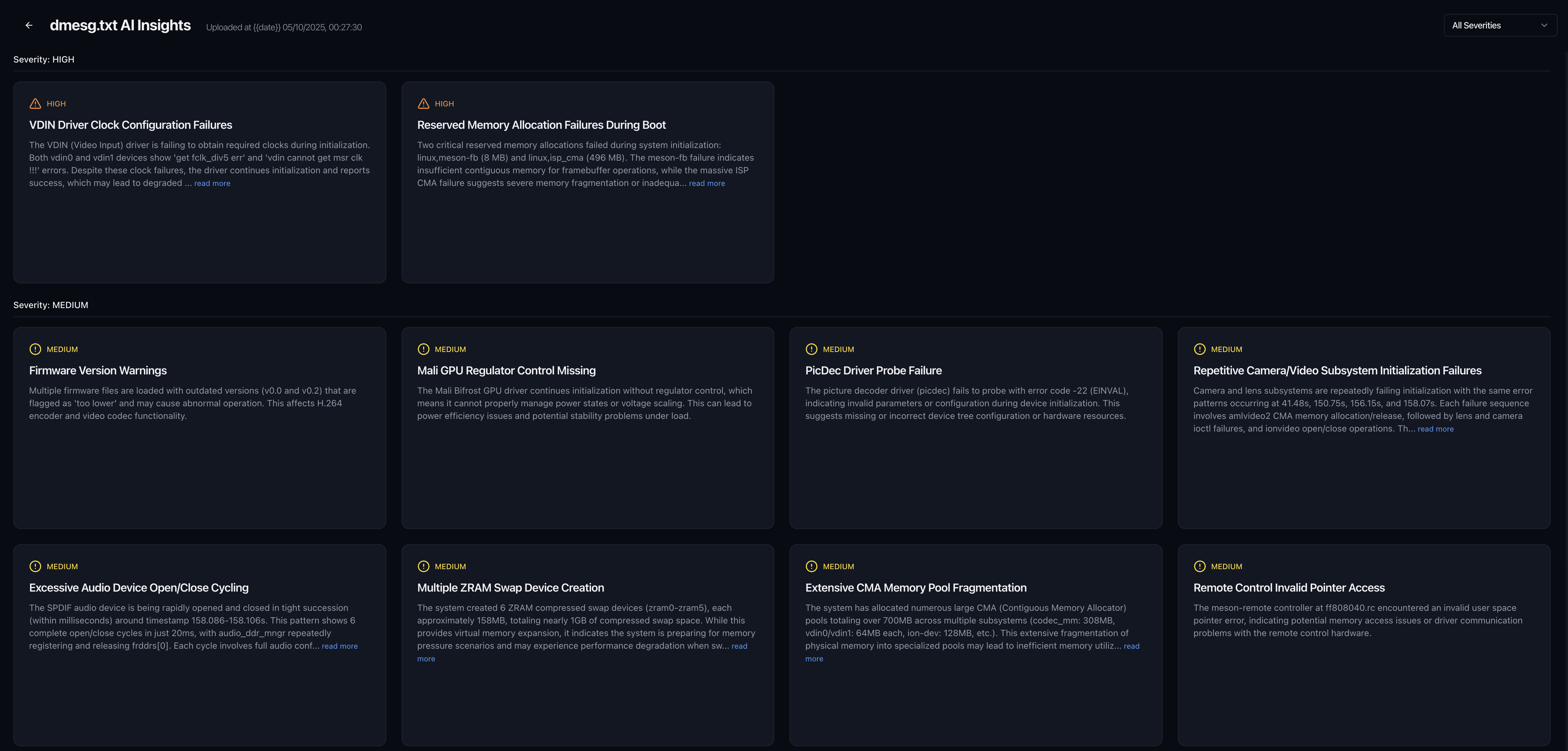
- Auto-detects kernel logs vs app logs and visualizes accordingly
- Interactive insights cards with severity-based prioritization
- Timeline correlation across
logcat,event_log, anddmesg
Conversational Debugging: Chat With Your Logs
Query showing memory pressure events
Query showing driver failures
- Ask questions like “Why did system_server crash?” or “Show me all memory pressure events before the kernel panic”
- AI retrieves relevant sections across all log sources and explains causality
- Understands kernel-specific queries: “Which driver failed during boot?” or “Show me all OOM killer events”
- Saves hours of manual correlation across fragmented log sources
Enterprise-Scale Performance
- Handles
100MB+bugreports and kernel logs with ease - Parallel processing pipeline with progress tracking
- Real-time updates as analysis completes
- Processes
dmesgfrom boot to crash, correlating timestamps across log sources
Real-World Use Cases
Finding Memory Leaks in Android System Services
Problem: Your device slows down after hours of use, but you can’t identify which system service is leaking memory.
With logcat.ai: Upload the bugreport, ask “Which processes show abnormal memory growth?” AI identifies
system_serverleak, pinpoints exact component (WindowManager), and shows memory allocation timeline.
Debugging Kernel Panics in Production Devices
Problem: Field devices experiencing random kernel panics. dmesg shows NULL pointer dereference but the root cause is unclear.
With logcat.ai: Upload
dmesg, AI traces panic back through subsystem timeline, identifies race condition in driver initialization, suggests fix based on similar patterns.
Analyzing ANR (Application Not Responding) Issues
Problem: Users report app freezes, but ANR traces don’t clearly show the blocking operation.
With logcat.ai: Chat interface helps you find blocked threads, identifies lock contention with system services, shows exact sequence of events leading to
ANR.
Why Domain-Specific AI Matters
Generic LLMs can answer questions about code or explain concepts, but debugging production issues requires:
- Structured parsing: Understanding 30+ bugreport formats, logcat variants, kernel log structures
- Temporal correlation: Linking events across
logcat,dmesg,event_logby timestamp - Subsystem knowledge: Knowing that a
SurfaceFlingererror might stem fromWindowManager, which might stem from memory pressure - Scale: Processing
100MBfiles with millions of log lines in minutes
logcat.ai is built from the ground up for Android and Linux observability, combining custom parsers, intelligent indexing, and AI analysis into a unified platform.
How Traditional Debugging Compares
Android Developer Scenario
| Before logcat.ai | With logcat.ai |
|---|---|
Download 87MB bugreport | Upload bugreport |
Extract logcat, event_log, dmesg separately | AI analyzes in 90 seconds |
grep for "FATAL", scroll through 200 matches | Critical insight: "OutOfMemory in system_server due to leaked WindowTokens from MyApp's dialog not being dismissed in onPause()" |
| Cross-reference timestamps between logs | Click through to exact log lines, stack trace, and recommended fix |
| Google cryptic error messages | |
| 3 hours later: “Might be a memory leak?” | 2 minutes: Problem solved |
Kernel Developer Scenario
| Before logcat.ai | With logcat.ai |
|---|---|
Parse dmesg output with custom scripts | Upload dmesg or full bugreport |
| Manually trace driver initialization sequence | AI identifies kernel panic at line 47,832 |
| Cross-reference subsystem interactions (networking, memory management, block I/O) | Analysis: "NULL pointer dereference in network driver due to race condition during interface initialization. IRQ handler called before device struct fully initialized." |
| Search LKML archives for similar panic signatures | See subsystem timeline showing exact sequence: device probe → interrupt registration → premature IRQ |
| 4+ hours to isolate root cause | Links to relevant code patterns and common fixes |
| 5 minutes to root cause |
Get Started Today
Request Beta Access: Visit logcat.ai and submit a signup request
Limited Beta Offer: The first 100 users will receive 30 days of free beta access.
We’re onboarding users in batches to ensure the best experience. Once approved, you’ll receive access to the full platform including:
- Full experience bugreport, logcat and kernel log analysis during your trial period
- AI-powered chat interface for interactive debugging
- Advanced visualization and timeline analysis
- Subsystem-level kernel log analysis
- Full API access with comprehensive documentation (Coming Soon)
- Priority support from our engineering team
Request your beta access now and transform how you debug Android and Linux systems.
The Vision: Intelligent Debugging for Everyone
We’re not just building a log viewer. We’re building the debugging companion every Android and Linux engineer wishes they had—one that never gets tired of reading logs, never misses a correlation, understands both userspace and kernel internals, and gets smarter along the way.
This is just v0.1 beta. We’re already working on:
- MCP server - Work with logcat.ai from any LLM (Claude Desktop, VS Code, etc.)
- Comparison mode - Compare two or more
logcats,dmesgs&bugreportsto see trends across builds - Custom dashboards - Create your own dashboard for the data you care about (analyze only your app and specific system services)
- Integration with Jira, GitHub Issues - Seamless workflow integration
- Custom log format parsers - Support for OEM-specific and embedded system logs
- On-Prem support - For privacy-oriented enterprise customers
The future of debugging is conversational. It’s intelligent. It understands your entire stack, from application layer to hardware.
Frequently Asked Questions
What file formats does logcat.ai support?
We support Android bugreports, individual logcat files and dmesg output.
How is my data secured?
All uploads are encrypted in transit and at rest. Interested in on-premise deployment? Contact us at developer@logcat.ai to discuss your security requirements.
Can logcat.ai analyze custom or proprietary log formats?
Custom parser support is on our roadmap! If you have OEM-specific logs or embedded system formats you’d like us to support, reach out to developer@logcat.ai and let us know your use case.
How does the AI chat interface work?
You can ask natural language questions about your logs, and our AI will search across all log sources, correlate events, and provide explanations. It’s like having a senior engineer review your logs.
Does logcat.ai have an API for automation?
Yes! Our RESTful API is coming soon and will allow you to programmatically upload logs, trigger analysis, and retrieve insights—perfect for CI/CD pipelines and automated testing. API documentation will be sent to you soon after your beta access approval.
What’s the difference between logcat.ai and traditional log viewers?
Traditional log viewers are search tools—you need to know what to look for. logcat.ai actively analyzes your logs, identifies issues you might miss, correlates events across subsystems, and explains causality. It’s proactive, not reactive.
Does logcat.ai work with Linux kernel logs from non-Android systems?
Absolutely! We support standard Linux dmesg output from any distribution—server, desktop, embedded, or Android. The kernel panic analysis works across all Linux-based systems.
Have questions? Reach out to us at developer@logcat.ai
Learn more: Visit our documentation
Built by Android and Linux engineers who’ve debugged one too many kernel panics and 100MB bugreports.
Share this post
Related Posts
Introducing Deep Research for logcat.ai
Introducing Deep Research: AI that investigates complex debugging problems like a senior engineer, …